
 Join our Discord
How It Works
- Clock In/Out:
- Go to the Allied Office and press
Eto clock in or out. - Tag scanning is only available while clocked in.
- Go to the Allied Office and press
- Tag Scanning:
- Tags appear within 241 meters (0.15 miles).
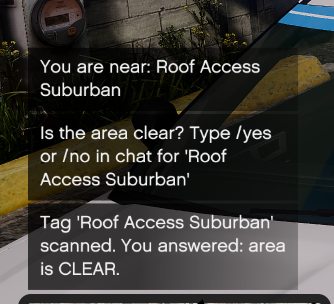
- Press
Eat a tag to scan it. Scanned tags disappear and reset after 7 in-game hours.
- Progress Tracking:
- View your progress with a completion bar above each tag.
- Use
/tagsto see the percentage of tags scanned.
- Area Confirmation:
- After scanning, confirm the area status:
/yes: Confirms the area is clear./no: Marks the area as unclear and requires a/report <details>.
- After scanning, confirm the area status:
- Activity Reports:
- Submit reports at any time using
/ar. - A text box pops up for you to type your activity report.
- Submit reports at any time using
- Reset on Clock Out:
- Clocking out removes all scanned tags and resets your progress.
Commands
/tags | Shows scanned tags and completion percentage.
/yes | Confirms the area is clear after scanning a tag.
/no | Marks the area as unclear; requires a /report explanation. /report | Submit reasons for unclear areas after using /no.
/ar | Opens a text box to submit an activity report.
Features
- Blip System:
- Tags are highlighted with blips when nearby.
- Blips disappear after scanning and reset after 7 in-game hours.
- Prompts & Notifications:
- Clear notifications guide players through clocking in, scanning, and submitting reports.
- Simple Reporting:
- Use
/arto easily submit activity reports.
- Use